Subscribe the API from API store
API store List:
- Changed Asset List Notification API
API result will include asset path in result if it satisfies following requirements:
- Modified between the given start time and end time
- Present under path '/content/dam/lenovo/iso/iso-channel-marketing'
- UAT: https://api-awsus-in-t.lenovo.com/uat/v1/common_data_model/dam/notification_list_changed/mktcenter/2021-05-16-07-00/2021-05-16-21-37/1/10.changedassetlistbyinterval.json
- PROD: https://api-awsus-in.lenovo.com/v1/common_data_model/dam/notification_list_changed/mktcenter/2024-05-16-07-00/2024-05-17-21-37/1/10.changedassetlistbyinterval.json
- Pramater:
{BaseUrl}/{consumer}/{startTime}/{endTime}/{pageNumber}.{pageSize}.changedassetlistbyinterval.json
Information regarding startTime and endTime inputs -
- ‘startTime’ and ‘endTime’ values should to be in UTC timezone
- ‘startTime’ and ‘endTime’ values should to be in format ‘yyyy-MM-dd-HH-mm’ where
- ‘yyyy’ represents 4 digit year number. Example 2020, 2021, etc.
- ‘MM’ represents 2 digit month number. Example 01,12, etc.
- ‘dd’ represents 2 digit valid day number within that month. Example 05,28, 31, etc.
- ‘HH’ represents 2 digit hour number from 00 through 23. Example 01, 14, 23, etc.
- ‘mm’ represents 2 digit minute number from 00 through 59.
- ‘endTime’ value should be at-least 30 minutes before current timestamp in UTC
- ‘endTime’ value needs to be later than ‘startTime’ value
- Earliest ‘startTime’ value allowed is 30 calendar days before current date in UTC
- Difference between ‘startTime’ and ‘endTime’ should NOT be greater than 24 hours
Few Sample URLs would be:
- {BaseUrl}/liferay/2021-01-28-00-00/2021-01-28-01-00/1/20.changedassetlistbyinterval.json
- {BaseUrl}/liferay/2021-01-28-03-00/2021-01-28-04-00/1/20.changedassetlistbyinterval.json
- {BaseUrl}/liferay/2021-01-28-03-00/2021-01-28-04-00/2/20.changedassetlistbyinterval.json
- Not Recommended:
- {BaseUrl}/liferay/2021-01-28-03-10/2021-01-28-04-25/1/20.changedassetlistbyinterval.json
- Response Sample:
{
"status": "Success",
"statusCode": "200",
"consumer": "liferay",
"pageSize": 10,
"pageNumber": 1,
"guessTotal": 2,
"resultSize": 2,
"startTime": "2024-06-05-05-00",
"endTime": "2024-06-05-05-30",
"hasMoreResults": false,
"assetList": [
{
"assetReferencePath": "/content/dam/lenovo/Studio-AI/cq5dam.jpeg",
"changeType": "create/modify"
},
{
"assetReferencePath": "/content/dam/lenovo/Studio-AI/LenovoHeader.png",
"changeType": "delete/expire"
}
]
}
b. Asset Info by Path API
- UAT:https://api-awsus-in-t.lenovo.com/uat/v1/common_data_model/dam/asset_info/mktcenter.assetinfobypath.json?refid=6eff77ae-442f-44a4-aa92-73fbb8da718b&refpath=/content/dam/lenovo/testing/translationapi/global-asset.jpg
- PROD: https://api-awsus-in.lenovo.com/v1/common_data_model/dam/notification_list_changed/mktcenter/2024-05-16-07-00/2024-05-17-21-37/1/10.changedassetlistbyinterval.json
- Parameter
{BaseUrl}/{consumer}. assetinfobypath.json?refid={refid}&refpath={refpath}
Information regarding input parameters -
- refid – refid is the reference id or uuid of the asset which is unique.
- Refpath – refpath is the reference path or the asset path.
Few Sample URLs would be:
- {BaseUrl}/{consumer}. assetinfobypath.json?refid=49589bbc-a28c-4cdc-8a7a-b30da9521fcd&refpath=/content/dam/lenovo/iso/iso-channel-marketing/campaigns/outcome-based-solutions/hosted-vdi/battlecard/OBS_VDI%20Hosted%20Desktop_Battle%20Card.pdf
- {BaseUrl}/{consumer}. assetinfobypath.json?refid=4958s43v-a28c-4cdc-8a7a-b3tg4332d&refpath=/content/dam/lenovo/iso/iso-channel-marketing/campaigns/input-based-solutions/vdi-system/battlecard/ LenovoLog.pdf
- Response sample:
{
"status": "Success",
"statusCode": "200",
"consumer": "mktcenter",
"referenceId": "ae66a177-a802-4796-a932-cf67c4944d37",
"referencePath": "/content/dam/lenovo/iso/iso-channel-marketing/alex-knight.jpg",
"assetInfo": {
"title": "alex knight",
"description": "asset desc",
"name": "alex-knight.jpg",
"assetReferenceId": "ae66a177-a802-4796-a932-cf67c4944d37",
"assetReferencePath": "/content/dam/lenovo/iso/iso-channel-marketing/alex-knight.jpg",
"isGated": "no",
"fileFormat": "JPEG",
"fileSizeBytes": "1013908",
"mimeType": "image/jpeg",
"resourcePagePath": "",
"expirationDate": "2025-08-31T00:15:00.000+08:00",
"createdDate": "2025-02-10T03:11:15.079Z",
"lastModified": "2025-02-10T03:10:59.927Z",
"usageRights": "Unlimited Worldwide Usage Rights",
"coBranded": "yes",
"partnerRoute": "toPartner",
"assetCheckSum": "2d71a0b5e7db45edda8672ebdf7f57d5a0798d62",
"assetStatus": {
"id": "Active",
"value": "Active"
},
"resourceType": [
{
"id": "Photography-Images",
"value": "Photography/Images"
}
],
"language": [
{
"id": "EN",
"value": "English"
}
],
"country": [
{
"id": "AU",
"value": "Australia"
}
],
"vertical": [
{
"id": "Education",
"value": "Education"
}
],
"contentTheme": [
{
"id": "Lenovo 360",
"value": "Lenovo 360"
}
],
"region": [
{
"id": "EMEA",
"value": "EMEA"
}
],
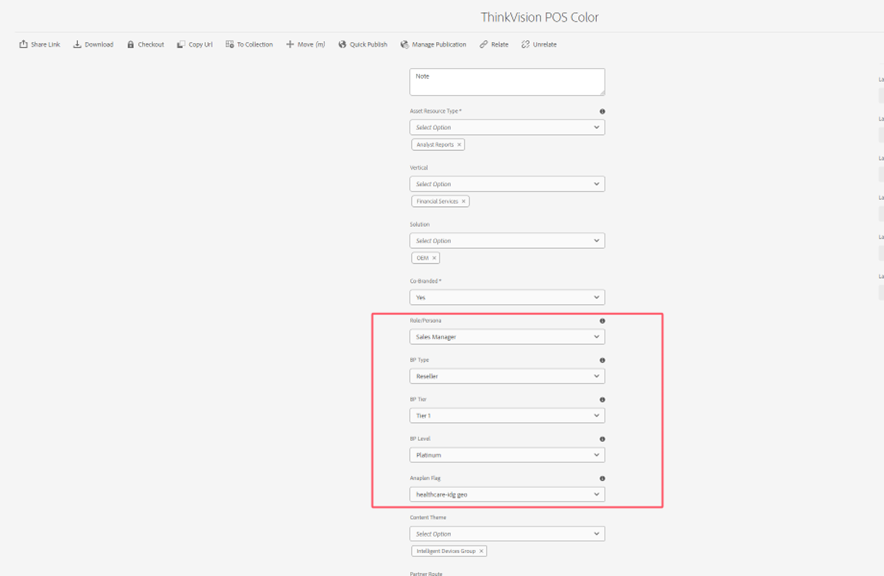
"rolePersona": [
{
"id": "Sales Rep",
"value": "Sales Rep"
}
],
"bpType": [
{
"id": "Reseller",
"value": "Reseller"
}
],
"bpTier": [
{
"id": "Tier 2",
"value": "Tier 2"
}
],
"bpLevel": [
{
"id": "Silver",
"value": "Silver"
}
],
"anaplanFlag": [
{
"id": "education-idg",
"value": "education-idg"
}
],
"assetOriginal": {
"url": "https://stage-cs.lenovo.com/content/dam/lenovo/iso/iso-channel-marketing/alex-knight.jpg",
"source": "Akamai",
"width": 4896,
"height": 3264
},
"assetThumbnail": [
{
"url": "https://stage-cs.lenovo.com/content/dam/lenovo/iso/iso-channel-marketing/alex-knight.jpg/jcr:content/renditions/cq5dam.thumbnail.48.48.png",
"source": "Akamai",
"width": 48,
"height": 48,
"format": "png"
},
{
"url": "https://stage-cs.lenovo.com/content/dam/lenovo/iso/iso-channel-marketing/alex-knight.jpg/jcr:content/renditions/cq5dam.thumbnail.140.100.png",
"source": "Akamai",
"width": 140,
"height": 100,
"format": "png"
},
{
"url": "https://stage-cs.lenovo.com/content/dam/lenovo/iso/iso-channel-marketing/alex-knight.jpg/jcr:content/renditions/cq5dam.web.1280.1280.jpeg",
"source": "Akamai",
"width": 1280,
"height": 1280,
"format": "jpeg"
},
{
"url": "https://stage-cs.lenovo.com/content/dam/lenovo/iso/iso-channel-marketing/alex-knight.jpg/jcr:content/renditions/cq5dam.zoom.2048.2048.jpeg",
"source": "Akamai",
"width": 2048,
"height": 2048,
"format": "jpeg"
},
{
"url": "https://stage-cs.lenovo.com/content/dam/lenovo/iso/iso-channel-marketing/alex-knight.jpg/jcr:content/renditions/cq5dam.thumbnail.319.319.png",
"source": "Akamai",
"width": 319,
"height": 319,
"format": "png"
}
]
}
}
3. Connect step:
- Use your client ID and client secret to fetch the wso2 token from https://api-awsus-in-t.lenovo.com/uat/token.
- Access the API using the wso2 token you fetched.
4. Metadata Property:
- Navigate to the related asset, checked the asset and click “Property” button on the toolbar.
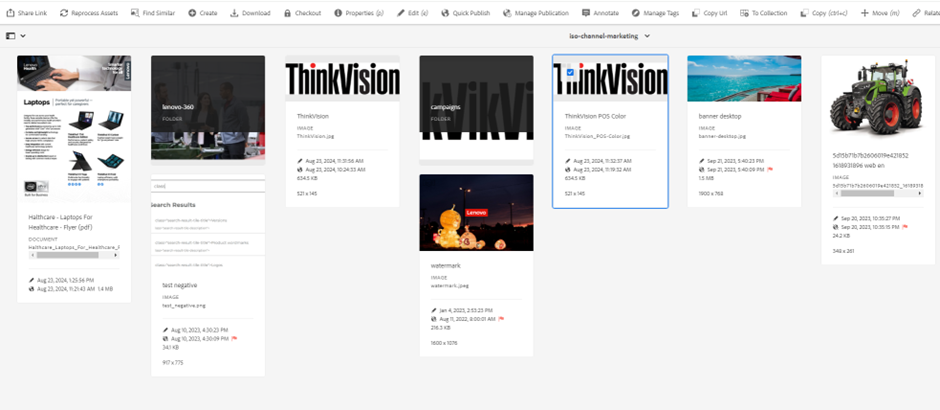
b. You will see the new metadata displayed