
——————————目录大纲——————————
————————————————————————一、说明
本文将尝试举例一些前后端代码进行功能说明,细节的说明主要看代码中的备注。
二、前端
1、组件文件结构
组件所在目录:lenovo-platform/ui.apps/src/main/content/jcr_root/apps/lenovo-platform/components/content
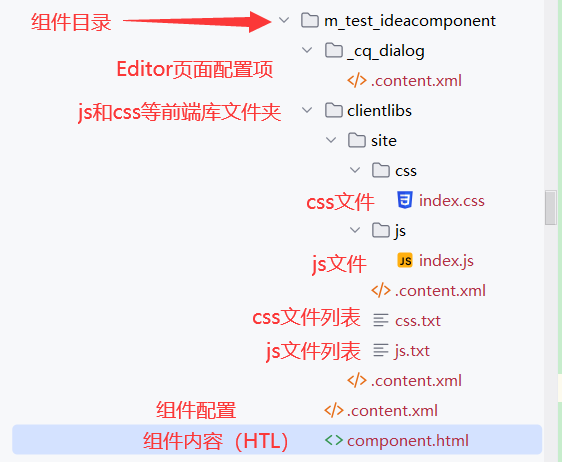
2、前端库文件(clientlibs和js、css)
2.1 clientlibs/.content.xml
primaryType=sling:Folder相当于指定当前层级为目录结构
<?xml version="1.0" encoding="UTF-8"?>
<jcr:root xmlns:jcr="http://www.jcp.org/jcr/1.0" xmlns:sling="http://sling.apache.org/jcr/sling/1.0"
    jcr:primaryType="sling:Folder"/>
sling:Folder是AEM中的一种JCR节点类型,用于在内容仓库中组织和管理内容。它继承了JCR标准的nt:folder节点类型的特性,可以包含其他节点,帮助构建内容的层次结构。
2.2 clientlibs/site/.content.xml
<?xml version="1.0" encoding="UTF-8"?>
<jcr:root xmlns:jcr="http://www.jcp.org/jcr/1.0" xmlns:cq="http://www.day.com/jcr/cq/1.0"
    jcr:primaryType="cq:ClientLibraryFolder"
    allowProxy="{Boolean}true"
    categories="[lenovo.platform.m_test_ideacomponent]"/>
jcr:primaryType="cq:ClientLibraryFolder"表明该节点及其子节点包含客户端库的资源,如CSS文件、JavaScript文件、图像等,cq:ClientLibraryFolder是一个特定的节点类型,用于定义Client Library文件夹;
allowProxy="{Boolean}true"当设置为true时,使Client Library可以通过/etc.clientlibs路径访问(例如,设置allowProxy="true"后,位于/apps/my-project/clientlibs/my-library的资源可以通过/etc.clientlibs/my-project/clientlibs/my-library访问。),这种设置有助于提升缓存性能和安全性;
categories="[lenovo.platform.m_test_ideacomponent]表明当前组件隶属的类别(相当于组件定义的名称),值是一个字符串数组,定义了Client Library所属的一个或多个类别,这些类别用于在页面和组件中引用和包含相应的Client Library。
这三个属性用于定义和配置AEM的Client Library文件夹,允许通过代理路径访问资源,并通过类别在页面和组件中引用和加载客户端库资源。
2.3 clientlibs/site/js/index.js
(() => {
    // 页面加载时调用
    document.addEventListener('DOMContentLoaded', function () {

    });

    trans = function() {
        var query = $('#trans-content').val();
        var component = $('.cmp-translate');
        var appKey = component.attr('appId');
        var key = component.attr('appKey');
        var salt = (new Date).getTime();
        var curtime = Math.round(new Date().getTime()/1000);
        var to = 'zh-CHS';
        var from = 'en';
        var str1 = appKey + truncate(query) + salt + curtime + key;
        // 用户词表ID
        var vocabId =  '';
        var sign = CryptoJS.SHA256(str1).toString(CryptoJS.enc.Hex);
        $.ajax({
            url: 'http://openapi.youdao.com/api',
            type: 'post',
            dataType: 'jsonp',
            data: {
                q: query,
                appKey: appKey,
                salt: salt,
                from: from,
                to: to,
                sign: sign,
                signType: "v3",
                curtime: curtime,
                vocabId: vocabId,
            },
            success: function (data) {
                var translation = data.translation[0]
                $('#result').html('翻译结果:' + translation);
            }
        });
    }

    const truncate = (q)=> {
        var len = q.length;
        if(len<=20) return q;
        return q.substring(0, 10) + len + q.substring(len-10, len);
    }

    transByServlet = function(appId, appKey) {
        var query = $('#trans-content').val();
        $.ajax({
            url: '/exp-services/lenovo/youdao?content=' + query + '&appId=' + appId + '&appKey=' + appKey,
            type: 'get',
            success: function (data) {
                var translation = data.translation
                $('#result').html('翻译结果:' + translation);
            }
        });
    }

})();
2.4 clientlibs/site/js.txt
js.txt文件用于指定需要包含在客户端库中的JavaScript文件列表,它帮助AEM在打包和加载Client Libraries时正确地包含和排序这些文件。
当AEM页面或组件引用一个Client Library时,AEM会根据js.txt中的定义加载相应的JavaScript文件。
#base=js
index.js
#base=js是一个指令,用于指定一个相对路径,这行指令告诉AEM,接下来的文件路径是相对于js文件夹的,该路径是包含在js.txt文件中的所有JavaScript文件的路径。
index.js:在js.txt中列出的文件名,路径被解释为/apps/my-project/clientlibs/my-library/js/index.js和/apps/my-project/clientlibs/my-library/js/script2.js
这样配置简化了文件路径管理,使得在js.txt中列出文件时可以使用相对路径,而不需要重复写完整路径。
通过这种配置方法,AEM可以高效地管理和加载客户端库中的JavaScript资源,提高前端资源管理的灵活性和可维护性。
2.5 clientlibs/site/css/index.css
.cmp-translate {
    margin-top: 20px;
}
2.6 clientlibs/site/css.txt
含义同理js.txt
#base=css
index.css
3、HTL(组件HTML)
3.1 component/.content.xml
组件目录下的content.xml配置文件,为组件当前的配置:
<?xml version="1.0" encoding="UTF-8"?>
<jcr:root xmlns:jcr="http://www.jcp.org/jcr/1.0" xmlns:cq="http://www.day.com/jcr/cq/1.0" xmlns:sling="http://sling.apache.org/jcr/sling/1.0"
    cq:icon="textLeft"
    jcr:description="有道翻译组件"
    jcr:primaryType="cq:Component"
    jcr:title="m_test_ideacomponent"
    sling:resourceSuperType="lenovo-platform/components/content/base-component/v1/base-component"
    componentGroup="Lenovo MTEST"/>
cq:icon 指定该组件在AEM触屏UI(Touch UI)中的图标。textLeft是图标的名称,表示在组件浏览器中显示的图标。
jcr:description 提供该组件的描述。这通常用在AEM UI中,当用户悬停在组件上时,显示组件的简短说明。
jcr:title 指定该组件的标题。在AEM UI中,组件浏览器和组件选择对话框中显示的名称
jcr:primaryType 定义此节点的主要类型。cq:Component表示这是一个AEM组件
sling:resourceSuperType 定义该组件的资源超类型。这表示该组件继承自lenovo-platform/components/content/base-component/v1/base-component。通过继承,你可以复用和扩展已有组件的功能和资源。
componentGroup 定义该组件所属的组件组,用于页面或者模板去根据组进行筛选。在AEM组件浏览器中,组件组用于组织和分类组件,以便于查找和使用。Lenovo MTEST是组件组的名称。
3.2 component/component.html
<!--data-sly-unwrap="${!wcmmode.edit}"在AEM中用于控制HTML元素的条件移除。具体来说,它会在非编辑模式下移除包裹的元素,只保留其子元素。
这种用法帮助优化最终的HTML输出,同时确保在编辑模式下编辑器的正常操作-->
<div class="cq-placeholder cmp-title" data-emptytext="${component.title}:Click to configure"
     data-sly-unwrap="${!wcmmode.edit}"></div>
<script src="https://cdnjs.cloudflare.com/ajax/libs/jquery/3.5.1/jquery.min.js"></script>
<script src="https://cdn.bootcdn.net/ajax/libs/crypto-js/4.0.0/crypto-js.js"></script>

<!--data-sly-use.clientLib为固定语句,属性引用了clientLib.js文件,并将其返回的对象绑定到clientLib变量-->
<sly data-sly-use.clientLib="${'/libs/granite/sightly/templates/clientlib.html'}"/>
<!--data-sly-cal中可以使用clientLib.all、clientLib.js、clientLib.css,categories需要和在clientlibs目录里面的categories一一对应-->
<sly data-sly-call="${clientLib.all @ categories='lenovo.platform.youdao-component'}"/>

<!--需要用到的model实体指向后端Java的包路径和model名称-->
<sly data-sly-use.mtm="com.lenovo.platform.core.models.YouDaoModel">
    <!--<div class="cmp-translate" appId="${properties.appId}" appKey="${properties.appKey}">-->
    <div class="cmp-translate" appId="${mtm.appId}" appKey="${mtm.appKey}">
        <input id="trans-content" type="text" placeholder="请输入需要翻译的英文内容">
        <br/>
        the appId is ${mtm.appId} <br />
        the requestAppId is ${mtm.requestAppId}<br />
        the service data is ${mtm.serviceData}<br />
        the service class name is ${mtm.className}<br />
        <button onclick="trans()">翻译</button>
        <br>
        <button onclick="transByServlet('${mtm.appId}','b')">翻译 by servlet</button><br>
        <br>
        <span id="result"></span>
        <br/>

    </div>
</sly>
sly标签为HTL使用的标签
${}可以访问到JCR中的数据,component、properties为HTL中可直接访问的Java对象。
data-sly-unwrap="${!wcmmode.edit}" 在AEM中用于控制HTML元素的条件移除。具体来说,它会在非编辑模式下移除包裹的元素,只保留其子元素。这种用法帮助优化最终的HTML输出,同时确保在编辑模式下编辑器的正常操作。
data-sly-use:
- 作用:data-sly-use用于在HTL脚本中引用Java对象、JavaScript文件或HTL模板,以便在模板中使用这些对象或逻辑。
- 示例:引用JavaScript文件clientLib.js并使用其返回的对象。
- 语法:data-sly-use.variableName="path/to/resource"
- data-sly-use.clientLib="${'/libs/granite/sightly/templates/clientlib.html'}":
该属性引用了clientLib.js文件,并将其返回的对象绑定到clientLib变量。
data-sly-call:
- 作用:用于调用HTL模板定义的模板或模板方法。它允许你在一个HTL文件中调用另一个HTL文件中的模板或方法,从而实现代码复用和逻辑分离。
- 示例:调用template.html中定义的模板sampleTemplate并传递参数。
- 语法:data-sly-call="${templateName @ param1='value1', param2='value2'}"
三、后端
1、Model(SlingModel)
1.1 Model 说明及使用
后端实体Model,通过前端的代码引用:
<sly data-sly-use.mtm="com.lenovo.platform.core.models.YouDaoModel">
Model代码如下(具体说明大致参考注释):
package com.lenovo.platform.core.models;

import com.adobe.cq.export.json.ExporterConstants;
import com.day.cq.commons.jcr.JcrConstants;
import com.day.cq.wcm.api.Page;
import com.day.cq.wcm.api.PageManager;
import com.lenovo.platform.core.services.FlashHeaderService;
import com.lenovo.platform.core.services.YouDaoService;
import org.apache.sling.api.SlingHttpServletRequest;
import org.apache.sling.api.SlingHttpServletResponse;
import org.apache.sling.api.resource.Resource;
import org.apache.sling.api.resource.ResourceResolver;
import org.apache.sling.api.resource.ValueMap;
import org.apache.sling.models.annotations.*;

import javax.annotation.PostConstruct;
import javax.inject.Inject;
import javax.inject.Named;

import org.apache.sling.models.annotations.injectorspecific.*;
import org.slf4j.Logger;
import org.slf4j.LoggerFactory;

/**
 * @Model声明这是一个SlingModel,组件的Java实体对象
 *  adaptables按照Resource声明这是一个JCR中的Resource节点,可以直接使用Resource匹配的API
 *  adapters属性表明在HTL中可以通过Translate类来适配这个SlingModel
 *  resourceType声明组件地址
 *  defaultInjectionStrategy默认注入策略为可选
 *
 * @Exporter声明这个SlingModel可以按json格式导出
 * @PostConstruct 在组件初始化的过程中,可以在init方法内添加操作
 * @ValueMapValue 是AEM的API在做好组件地址适配后,可以从组件对应的Resource中获取内容
 */
@Model(
        adaptables = {SlingHttpServletRequest.class},
        resourceType = "lenovo-platform/components/content/m_test_ideacomponent",
        defaultInjectionStrategy = DefaultInjectionStrategy.OPTIONAL
)
@Exporter(name = ExporterConstants.SLING_MODEL_EXPORTER_NAME, extensions = ExporterConstants.SLING_MODEL_EXTENSION,
        options = {
                @ExporterOption(name = "MapperFeature.SORT_PROPERTIES_ALPHABETICALLY", value = "true"),
                @ExporterOption(name = "SerializationFeature.WRITE_DATES_AS_TIMESTAMPS", value = "false") })
public class YouDaoModel {

    private static final Logger log = LoggerFactory.getLogger(YouDaoModel.class);

    @Inject
    @RequestAttribute(name = "appId")
    private String requestAppId;

    @Inject
    @Named("appId")
    @Via("resource")
    private String appId;

    @Inject
    @Named("appKey")
    @Via("resource")
    private String appKey;

    @Inject
    private Page currentPage;

    @ScriptVariable
    private ValueMap properties;

    @Inject
    private ResourceResolver resourceResolver;

    @Self
    private SlingHttpServletRequest request;

    @Self
    private SlingHttpServletResponse response;

    @OSGiService(filter = "(component.name=YouDaoServiceImpl)")
    YouDaoService youDaoService;

    @SlingObject
    private Resource resource;

    @PostConstruct
    public void init() {
        // AEM API:AEM API 提供了特定于产品化用例的抽象概念和功能
        // resourceResolver是资源转换类,可以通过此类获取对应的页面,也可以转换为其他API
        PageManager pageManager = resourceResolver.adaptTo(PageManager.class);
        // pageManager可以通过页面路径获取到对应的Page对象
        Page page = pageManager.getPage("/content/lenovo/www/global/en/t3");
        // 也可以直接使用currentPage
        log.info("page title = {}", page.getTitle());
        // 所以从pageManager中通过路径获取到Page对象和currentPage对象,表示的是JCR中同一个页面节点
        log.info("current page title = {}", currentPage.getTitle());

        // Sling API
        // 通过SlingHttpServletRequest也可以获取到当前页面的地址信息
        String path = request.getHeader("Referer");
        log.info("page request path : {}", path);

        // JCR API
        // 获取到地址信息后,就可以拿到这个页面下所有的节点和数据内容,由于page和currentPage表示同一个页面节点,所以拿到的页面内容是一致的
        ValueMap pageVM = page.getProperties();
        ValueMap currentPageVM = currentPage.getProperties();
        log.info("title = {}", pageVM.get(JcrConstants.JCR_TITLE, String.class));
        log.info("title = {}", currentPageVM.get(JcrConstants.JCR_TITLE, String.class));

        // 也可以通过Sling API来创建页面和资源,通过模板来创建页面
//        String templatePath = "/conf/wknd/settings/wcm/templates/steven";
//        pageManager.create("/content/wknd/us/en", "steven-new", templatePath, "steven new page", true);
//        resourceResolver.commit();
        // 获取组件属性及内容
        ValueMap valueMap = resource.getValueMap();
        log.info("appId from resource = {}", valueMap.get("appId", String.class));
        log.info("appId from properties = {}", properties.get("appId", String.class));

        // 获取request请求中的参数
        String requestAppId = String.valueOf(request.getRequestParameter("requestAppId"));
        log.info("requestAppId = {}", requestAppId);

        // 从OSGI Service中获取参数
        String appIdFromService = youDaoService.getAppId(resource);
        String appKeyFromService = youDaoService.getAppKey(resource);
        log.info("appId from service = {}", appIdFromService);
        log.info("appKey from service = {}", appKeyFromService);
    }

    public String className() {
        return youDaoService.getName();
    }

    public String getAppId() {
        return appId;
    }

    public void setAppId(String appId) {
        this.appId = appId;
    }

    public String getAppKey() {
        return appKey;
    }

    public void setAppKey(String appKey) {
        this.appKey = appKey;
    }

    public String getRequestAppId() {
        return requestAppId;
    }

    public void setRequestAppId(String requestAppId) {
        this.requestAppId = requestAppId;
    }
}
@Model(adaptables = {SlingHttpServletRequest.class}) :
- 表明该Sling Model适配自HTTP请求,用于处理HTTP请求数据,如URL:http://localhost:4502/content/myapp/homepage.html?appId=12345。
- 可以使用如下注解进行字段获取处理:
- @RequestAttribute(name = "appId")
- private String requestAppId;
@Model(adaptables = {Resource.class}) :
- 表明该Sling Model适配自资源(Resource)
- 资源适配用于访问JCR节点中的数据
@ValueMapValue
- 用于注入资源属性值,通常与JCR属性绑定。
@RequestAttribute
- 用于注入HTTP请求参数。
@Self
- 直接注入当前上下文对象,如请求、响应或资源。
@Inject
- 作用:@Inject注解用于指示Sling Model的Sling Model Injector从特定来源注入值。在这种情况下,值将从资源属性中注入。
- 示例:在本例中,appId属性将被注入一个值,该值将从指定的来源(资源或请求)获取。
@Named("appId")
- 作用:@Named注解用于指定要注入的属性的名称。它告诉Sling Model Injector从资源的哪个属性中获取值。
- 示例:@Named("appId")指定要注入的属性名称是appId,即资源节点中的appId属性。
@Via("resource")
- 作用:@Via注解用于指定从哪个来源注入值。在本例中,它指定从资源(resource)中获取值。
- 示例:@Via("resource")告诉Sling Model Injector从绑定到当前模型的资源节点中获取appId属性的值。
1.2 接口访问数据结构
对应在CRX上查看配置的组件数据结构,路径/content/lenovo/www/global/en/t3/jcr:content/root/responsivegrid/m_test_ideacomponent:
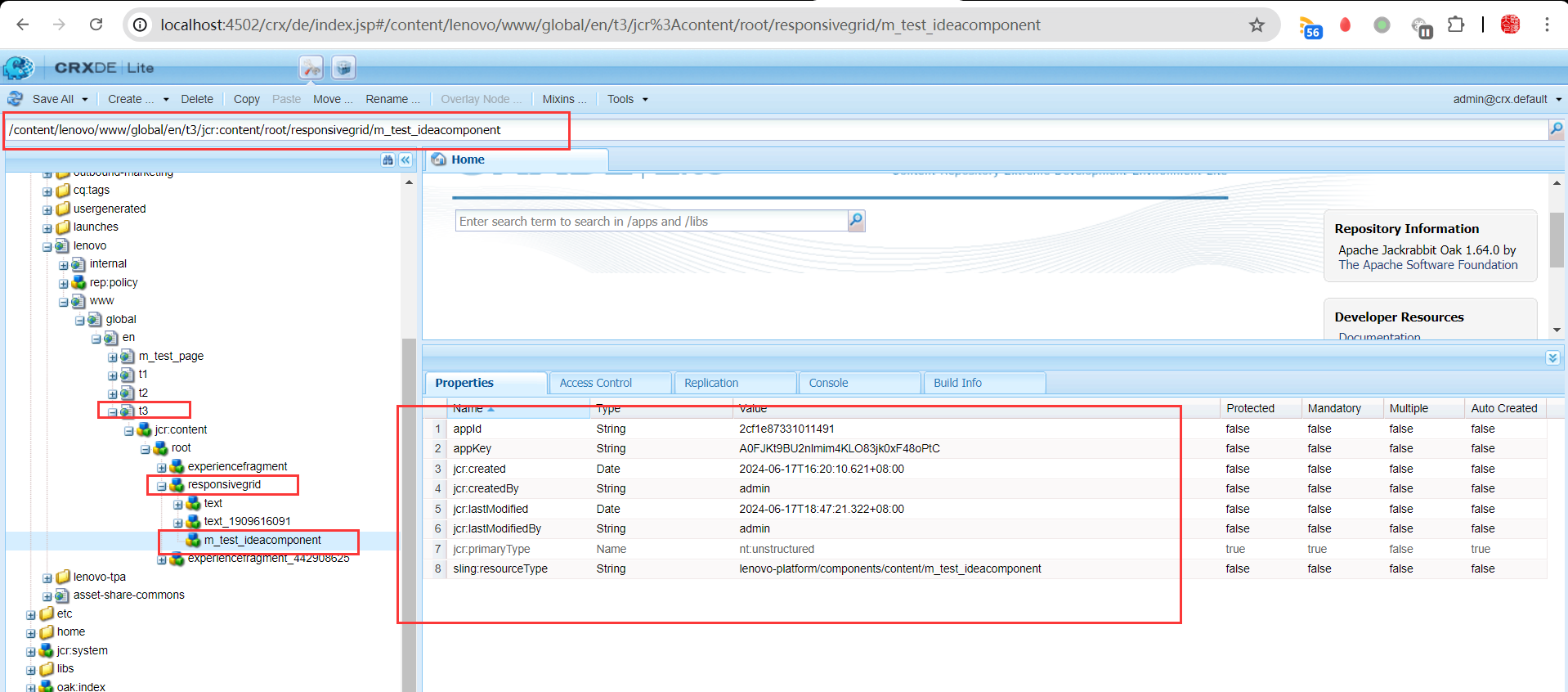
返回结果如下:
{
    "jcr:primaryType": "nt:unstructured",
    "jcr:createdBy": "admin",
    "appKey": "A0FJKt9BU2nlmim4KLO83jk0xF48oPtC",
    "jcr:lastModifiedBy": "admin",
    "jcr:created": "Mon Jun 17 2024 16:20:10 GMT+0800",
    "appId": "2cf1e87331011491",
    "jcr:lastModified": "Mon Jun 17 2024 18:47:21 GMT+0800",
    "sling:resourceType": "lenovo-platform/components/content/m_test_ideacomponent"
}
2、OSGI Service
2.1 接口类
路径:lenovo-platform/core/src/main/java/com/lenovo/platform/core/services/YouDaoService.java
package com.lenovo.platform.core.services;

import com.day.cq.wcm.api.Page;
import org.apache.sling.api.SlingHttpServletRequest;
import org.apache.sling.api.resource.Resource;

/**
 * 接口类
 */
public interface YouDaoService {

    public String sendRequest(SlingHttpServletRequest request, Resource currentPageResource, Page currentPage);

    String getAppId(Resource resource);
    String getAppKey(Resource resource);
}
2.2 实现类
路径:lenovo-platform/core/src/main/java/com/lenovo/platform/core/services/impl/YouDaoServiceImpl.java
package com.lenovo.platform.core.services.impl;

import com.day.cq.wcm.api.Page;
import com.lenovo.platform.api.client.RestClient;
import com.lenovo.platform.api.request.BaseRequest;
import com.lenovo.platform.api.request.impl.BaseRequestImpl;
import com.lenovo.platform.api.request.util.HttpMethodType;
import com.lenovo.platform.api.response.BaseResponse;
import com.lenovo.platform.core.constants.LenovoPlatformConstants;
import com.lenovo.platform.core.services.YouDaoService;
import com.lenovo.platform.core.services.configs.YouDaoConfiguration;
import com.lenovo.platform.core.utils.CommonHelper;
import org.apache.commons.lang3.StringUtils;
import org.apache.sling.api.SlingHttpServletRequest;
import org.apache.sling.api.resource.*;
import org.osgi.service.component.ComponentContext;
import org.osgi.service.component.annotations.*;
import org.osgi.service.metatype.annotations.Designate;
import org.slf4j.Logger;
import org.slf4j.LoggerFactory;

import java.util.HashMap;
import java.util.Map;
import java.util.regex.Matcher;
import java.util.regex.Pattern;

/**
 * 接口实现类
 *
 */
@Component(service = YouDaoService.class, immediate = true, name = "YouDaoServiceImpl")
@Designate(ocd = YouDaoConfiguration.class)
public class YouDaoServiceImpl implements YouDaoService {

    // Constant LOG
    private static final Logger log = LoggerFactory.getLogger(YouDaoServiceImpl.class);

    private YouDaoConfiguration config;

    @Reference
    private ResourceResolverFactory resourceResolverFactory;

    @Reference
    private RestClient restClient;

    private String headerDomainURL;

    private String headerEndpointURL;

    private String responseData = StringUtils.EMPTY;

    private String countrycode = "us";

    private String languagecode = "en";

    private String endPointURL;

    private String path;

    private String siteRoot;

    private String lenovoTemplate = "/conf/lenovo-www/settings/wcm/templates";

    private String pattern = "/maintenance/500page\\.html"; // Escape special characters

    public String sendRequest(SlingHttpServletRequest request, Resource currentPageResource, Page currentPage) {
        Map<String, String> parameterMap = new HashMap<>();
        log.info("Inside YouDaoServiceImpl");
        try (ResourceResolver resourceResolver = CommonHelper.getServiceResolver(resourceResolverFactory)) {
            headerDomainURL = config.headerDomainURL();
            headerEndpointURL = config.headerEndpointURL();
            path = currentPage.getPath();

            if (!path.isEmpty() && !headerDomainURL.isEmpty() && !headerEndpointURL.isEmpty()) {
                if (path.contains(LenovoPlatformConstants.WWW_XF_PATH)) {
                    siteRoot = getXFSiteRoot(path);

                } else if (path.contains(lenovoTemplate) || path.contains(LenovoPlatformConstants.WWW_GLOBAL_SLASH)) {
                    siteRoot = countrycode + LenovoPlatformConstants.SLASH + languagecode;

                } else {
                    if (path.contains(LenovoPlatformConstants.WWW_PAGE_PATH)
                            && !currentPage.getPath().contains(LenovoPlatformConstants.WWW_GLOBAL_SLASH)) {
                        getWWWSiteRoot(path);

                    } else {
                        siteRoot = countrycode + LenovoPlatformConstants.SLASH + languagecode;

                    }
                }

                endPointURL = headerDomainURL + siteRoot + headerEndpointURL;

                log.info("endPointURL -  {}", endPointURL);
                final BaseRequest baseRequest = new BaseRequestImpl(endPointURL, HttpMethodType.GET, StringUtils.EMPTY);
                parameterMap.put("USER-AGENT", request.getHeader("USER-AGENT"));
                BaseResponse baseResponse = restClient.sendRequest(baseRequest, parameterMap);

                if (baseResponse != null) {
                    responseData = baseResponse.getResponseData();
                    log.info("baseResponse not null");
                    if (responseData == null || !StringUtils.isNotBlank(responseData)) {
                        responseData = "";
                        log.info("No responseData");
                    }
                    Pattern regex = Pattern.compile(pattern);
                    Matcher matcher = regex.matcher(responseData);
                    if (matcher.find()) {
                        responseData = "";
                        log.info("No responseData");
                    }
                    log.info("responseData -  {}", responseData);
                }
            }
        } catch (LoginException exception) {
            log.error("LoginException in YouDao header request {}", exception.getMessage(), exception);
        }
        log.info("responseData -  {}", responseData);
        log.info("Exited YouDaoServiceImpl sendHeaderRequest");

        return responseData;
    }

    @Override
    public String getName() {
        return this.getClass().getName();
    }

    /**
     * @param pagePath
     */
    public void getWWWSiteRoot(String pagePath) {
        String countryLanguageCode = null;
        int firstSlashAfterPattern = pagePath.indexOf('/', LenovoPlatformConstants.WWW_PAGE_PATH.length());
        if (firstSlashAfterPattern != -1 && (pagePath.indexOf('/', firstSlashAfterPattern + 1) != -1)) {
            countryLanguageCode = pagePath.substring(LenovoPlatformConstants.WWW_PAGE_PATH.length(),
                    pagePath.indexOf('/', firstSlashAfterPattern + 1));
        }
        if (null != countryLanguageCode && !countryLanguageCode.isEmpty()) {
            siteRoot = countryLanguageCode;
        }
    }

    /**
     * Create site root for the pages using experience fragments for header
     * If the experience fragmnet falls back to global/en, set us/en as siteroot
     *
     * @param pagePath
     * @return siteRoot
     */
    public String getXFSiteRoot(String pagePath) {
        String[] pathArray = StringUtils.split(pagePath, LenovoPlatformConstants.SLASH);
        String xfCountryCode = pathArray[4];
        String xfLanguageCode = pathArray[5];

        if(StringUtils.contains(pagePath, "global")) {
            return countrycode + LenovoPlatformConstants.SLASH + languagecode;
        } else {
            return xfCountryCode + LenovoPlatformConstants.SLASH + xfLanguageCode;
        }
    }

    /**
     * @param config
     */
    @Activate
    public void activate(YouDaoConfiguration config) {
        this.config = config;
        log.info("============== YouDaoService activate ==============");
    }

    @Deactivate
    public void deactivate(ComponentContext componentContext) {
        log.info("============== YouDaoService deactivate ==============");
    }

    @Modified
    public void modified(ComponentContext componentContext) {
        log.info("============== YouDaoService modified ==============");
    }

    @Override
    public String getAppId(Resource resource) {
        ValueMap valueMap = resource.getValueMap();
        // 查询appId属性,如果为null,则返回""
        return valueMap.get("appId", "");
    }

    @Override
    public String getAppKey(Resource resource) {
        ValueMap valueMap = resource.getValueMap();
        // 查询appKey属性,如果为null,则返回""
        return valueMap.get("appKey", "");
    }
}
2.3 多实现类
路径:lenovo-platform/core/src/main/java/com/lenovo/platform/core/services/impl/YouDaoAIServiceImpl.java
package com.lenovo.platform.core.services.impl;

import com.day.cq.wcm.api.Page;
import com.lenovo.platform.api.client.RestClient;
import com.lenovo.platform.api.request.BaseRequest;
import com.lenovo.platform.api.request.impl.BaseRequestImpl;
import com.lenovo.platform.api.request.util.HttpMethodType;
import com.lenovo.platform.api.response.BaseResponse;
import com.lenovo.platform.core.constants.LenovoPlatformConstants;
import com.lenovo.platform.core.services.YouDaoService;
import com.lenovo.platform.core.services.configs.YouDaoConfiguration;
import com.lenovo.platform.core.utils.CommonHelper;
import org.apache.commons.lang3.StringUtils;
import org.apache.sling.api.SlingHttpServletRequest;
import org.apache.sling.api.resource.*;
import org.osgi.service.component.ComponentContext;
import org.osgi.service.component.annotations.*;
import org.osgi.service.metatype.annotations.Designate;
import org.slf4j.Logger;
import org.slf4j.LoggerFactory;

import java.util.HashMap;
import java.util.Map;
import java.util.regex.Matcher;
import java.util.regex.Pattern;

/**
 * 接口实现类
 *
 */
@Component(service = YouDaoService.class, immediate = true)
@Designate(ocd = YouDaoConfiguration.class)
public class YouDaoAIServiceImpl implements YouDaoService {

    // Constant LOG
    private static final Logger log = LoggerFactory.getLogger(YouDaoAIServiceImpl.class);

    private YouDaoConfiguration config;

    @Reference
    private ResourceResolverFactory resourceResolverFactory;

    @Reference
    private RestClient restClient;

    private String responseData = StringUtils.EMPTY;

    @Override
    public String getName() {
        return this.getClass().getName();
    }

    /**
     * @param config
     */
    @Activate
    public void activate(YouDaoConfiguration config) {
        this.config = config;
        log.info("============== YouDaoAIService activate ==============");
    }

    @Deactivate
    public void deactivate(ComponentContext componentContext) {
        log.info("============== YouDaoAIService deactivate ==============");
    }

    @Modified
    public void modified(ComponentContext componentContext) {
        log.info("============== YouDaoAIService modified ==============");
    }

    @Override
    public String sendRequest(SlingHttpServletRequest request, Resource currentPageResource, Page currentPage) {
        return "Helloworld";
    }

    @Override
    public String getAppId(Resource resource) {
        ValueMap valueMap = resource.getValueMap();
        // 查询appId属性,如果为null,则返回""
        return valueMap.get("appId", responseData);
    }

    @Override
    public String getAppKey(Resource resource) {
        ValueMap valueMap = resource.getValueMap();
        // 查询appKey属性,如果为null,则返回""
        return valueMap.get("appKey", responseData);
    }
}
interface加入:
String getName();
实现类加入:
@Override
public String getName() {
    return this.getClass().getName();
}
slingModel加入方法:
public String className() {
        return youDaoService.getName();
    }
组件代码加入:
the service class name is ${mtm.className}界面上得到结果:
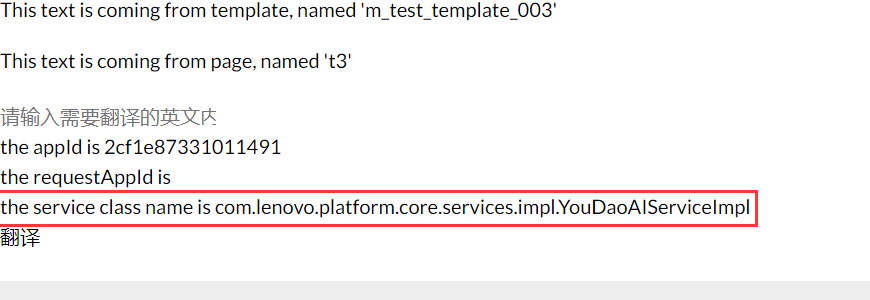
因为会默认没有配置,则会按照名称加载,因为A在前所以会先选取A类。
修改一下接口实现:
@Component(service = YouDaoService.class, immediate = true, name = "YouDaoServiceImpl")
@Designate(ocd = YouDaoConfiguration.class)
public class YouDaoServiceImpl implements YouDaoService {
增加name="YouDaoServiceImpl"
然后再slingModel指定:
@OSGiService(filter = "(component.name=YouDaoServiceImpl)")
YouDaoService youDaoService;
Build后再次查看结果:
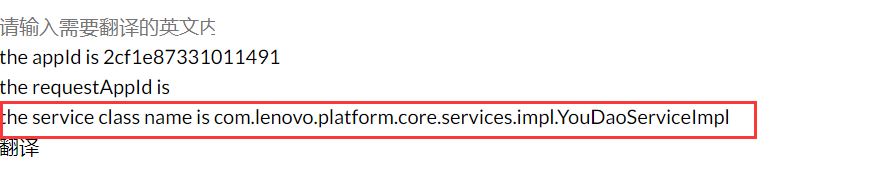
精确找到了需要的service实现。
3、OSGI Configuration
路径:lenovo-platform/core/src/main/java/com/lenovo/platform/core/services/configs/YouDaoConfiguration.java
package com.lenovo.platform.core.services.configs;

import org.osgi.service.metatype.annotations.AttributeDefinition;
import org.osgi.service.metatype.annotations.AttributeType;
import org.osgi.service.metatype.annotations.ObjectClassDefinition;
import org.osgi.service.metatype.annotations.Option;

/**
 * YouDaoService的Configuration
 * @ObjectClassDefinition 声明此类是一个OSGi配置信息类
 */
@ObjectClassDefinition(name = "YouDao Configuration", description = "Configure YouDao Service")
public @interface YouDaoConfiguration {

    /**
     * @AttributeDefinition 声明字段名称和描述
     */
    @AttributeDefinition(name = "App Id", description = "App Id")
    String appId() default "";

    @AttributeDefinition(name = "App Key", description = "App Key")
    String appKey() default "";

    @AttributeDefinition(name = "Enable or Disable to translate", description = "Enable or Disable to translate")
    boolean isEnable() default true;

    @AttributeDefinition(name = "Translate Type", description = "Translate Type", options = {
            @Option(label = "YouDao", value = "1"),
            @Option(label = "BaiDu", value = "2")
    })
    String type() default "1";

    @AttributeDefinition(name = "Lenovo Domain URL", description = " Lenovo domain URL for Flash Header.", type = AttributeType.STRING)
    public String headerDomainURL() default "https://www.lenovo.com/";

    @AttributeDefinition(name = "Lenovo Endpoint URL", description = " Lenovo Endpoint URL for Flash Header.", type = AttributeType.STRING)
    public String headerEndpointURL() default "/get_nav_api/site_common_frag/masthead/header.html";
}
当配置了Configuration,那么可以在后台(http://localhost:4502/system/console/configMgr)查看对应配置:
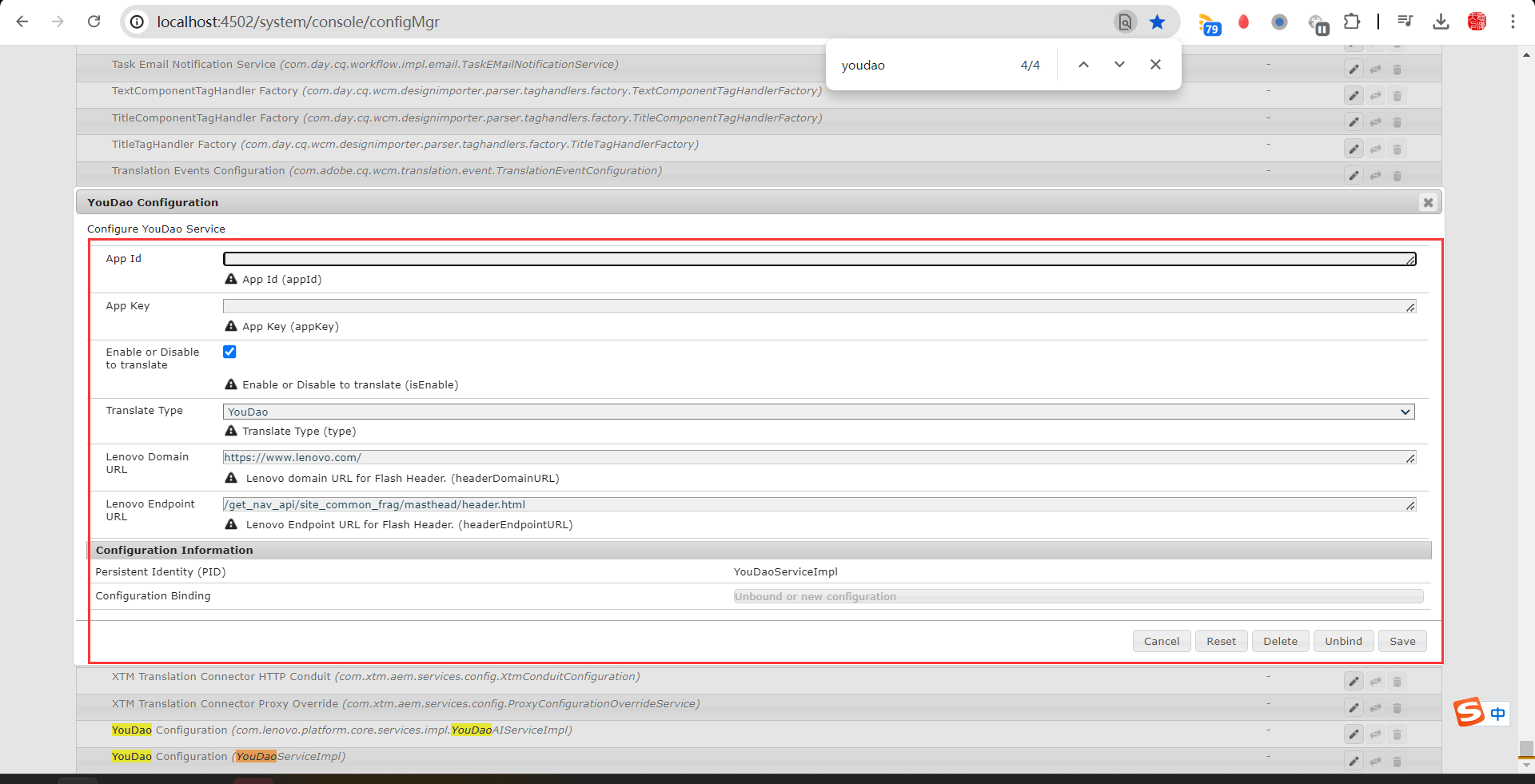
甚至可以保存数据进入
4、Sling Servlet
路径:lenovo-platform/core/src/main/java/com/lenovo/platform/core/servlets/YouDaoServlet.java
package com.lenovo.platform.core.servlets;

import org.apache.http.HttpEntity;
import org.apache.http.client.entity.UrlEncodedFormEntity;
import org.apache.http.client.methods.CloseableHttpResponse;
import org.apache.http.client.methods.HttpPost;
import org.apache.http.impl.client.CloseableHttpClient;
import org.apache.http.impl.client.HttpClients;
import org.apache.http.message.BasicNameValuePair;
import org.apache.http.util.EntityUtils;
import org.apache.sling.api.SlingHttpServletRequest;
import org.apache.sling.api.SlingHttpServletResponse;
import org.apache.sling.api.servlets.HttpConstants;
import org.apache.sling.api.servlets.SlingAllMethodsServlet;
import org.osgi.service.component.annotations.Component;
import org.slf4j.Logger;
import org.slf4j.LoggerFactory;

import javax.servlet.Servlet;
import javax.servlet.ServletException;
import java.io.File;
import java.io.FileOutputStream;
import java.io.IOException;
import java.io.PrintWriter;
import java.nio.charset.StandardCharsets;
import java.security.MessageDigest;
import java.security.NoSuchAlgorithmException;
import org.apache.http.Header;
import org.apache.http.NameValuePair;
import java.io.ByteArrayOutputStream;
import java.util.ArrayList;
import java.util.HashMap;
import java.util.List;
import java.util.Map;

import static org.osgi.framework.Constants.SERVICE_DESCRIPTION;

@Component(service = {Servlet.class},
        property = {
                SERVICE_DESCRIPTION + "= Servlet to translate",
                "sling.servlet.paths=/exp-services/lenovo/youdao",
                "sling.servlet.methods=" + HttpConstants.METHOD_GET,
                "sling.servlet.extensions=json"})
public class YouDaoServlet extends SlingAllMethodsServlet {

    private static final Logger log = LoggerFactory.getLogger(YouDaoServlet.class);

    private static final String YOUDAO_URL = "https://openapi.youdao.com/api";

    private static final String APP_KEY = "abc";

    private static final String APP_SECRET = "cba";

    @Override
    protected void doGet(SlingHttpServletRequest request, SlingHttpServletResponse response)
            throws ServletException, IOException {

        getResult(request, response);
    }

    @Override
    protected void doPost(SlingHttpServletRequest request, SlingHttpServletResponse response)
            throws ServletException, IOException {
        // Do nothing here
    }

    private void getResult(SlingHttpServletRequest request, SlingHttpServletResponse response) throws IOException{
        String q = request.getRequestParameter("content").toString();
        String appId = request.getRequestParameter("appId").toString();
        String appKey = request.getRequestParameter("appKey").toString();
        Map<String, String> params = new HashMap<>();
        String salt = String.valueOf(System.currentTimeMillis());
        params.put("from", "en");
        params.put("to", "zh-CHS");
        params.put("signType", "v3");
        String curtime = String.valueOf(System.currentTimeMillis() / 1000);
        params.put("curtime", curtime);
        String signStr = appId + truncate(q) + salt + curtime + APP_SECRET;
        String sign = getDigest(signStr);
        params.put("appKey", appKey);
        params.put("q", q);
        params.put("salt", salt);
        params.put("sign", sign);
        params.put("vocabId", "");
        /* 处理结果 */
        String result = requestForHttp(YOUDAO_URL, params);
        // 设置返回数据类型为json,编码格式为UTF-8
        response.setContentType("application/json;charset=utf-8");
        PrintWriter writer = response.getWriter();
        writer.print(result);
        writer.close();
    }

    public static String requestForHttp(String url, Map<String, String> params) throws IOException {

        /* 创建HttpClient */
        CloseableHttpClient httpClient = HttpClients.createDefault();

        /* httpPost */
        HttpPost httpPost = new HttpPost(url);
        List<NameValuePair> paramsList = new ArrayList<>();
        for (Map.Entry<String, String> en : params.entrySet()) {
            String key = en.getKey();
            String value = en.getValue();
            paramsList.add(new BasicNameValuePair(key, value));
        }
        httpPost.setEntity(new UrlEncodedFormEntity(paramsList, "UTF-8"));
        CloseableHttpResponse httpResponse = httpClient.execute(httpPost);
        try {
            Header[] contentType = httpResponse.getHeaders("Content-Type");
            log.info("Content-Type:" + contentType[0].getValue());
            if ("audio/mp3".equals(contentType[0].getValue())) {
                //如果响应是wav
                HttpEntity httpEntity = httpResponse.getEntity();
                ByteArrayOutputStream baos = new ByteArrayOutputStream();
                httpResponse.getEntity().writeTo(baos);
                byte[] result = baos.toByteArray();
                EntityUtils.consume(httpEntity);
                //合成成功
                String file = "合成的音频存储路径" + System.currentTimeMillis() + ".mp3";
                byte2File(result, file);
            } else {
                /* 响应不是音频流,直接显示结果 */
                HttpEntity httpEntity = httpResponse.getEntity();
                String json = EntityUtils.toString(httpEntity, "UTF-8");
                EntityUtils.consume(httpEntity);
                log.info(json);
                return json;
            }
        } finally {
            try {
                if (httpResponse != null) {
                    httpResponse.close();
                }
            } catch (IOException e) {
                log.info("## release resouce error ##" + e);
            }
        }
        return "";
    }

    /**
     * 生成加密字段
     */
    public static String getDigest(String string) {
        if (string == null) {
            return null;
        }
        char[] hexDigits = {'0', '1', '2', '3', '4', '5', '6', '7', '8', '9', 'A', 'B', 'C', 'D', 'E', 'F'};
        byte[] btInput = string.getBytes(StandardCharsets.UTF_8);
        try {
            MessageDigest mdInst = MessageDigest.getInstance("SHA-256");
            mdInst.update(btInput);
            byte[] md = mdInst.digest();
            int j = md.length;
            char[] str = new char[j * 2];
            int k = 0;
            for (byte byte0 : md) {
                str[k++] = hexDigits[byte0 >>> 4 & 0xf];
                str[k++] = hexDigits[byte0 & 0xf];
            }
            return new String(str);
        } catch (NoSuchAlgorithmException e) {
            return null;
        }
    }

    /**
     * @param result 音频字节流
     * @param file   存储路径
     */
    private static void byte2File(byte[] result, String file) {
        File audioFile = new File(file);
        FileOutputStream fos = null;
        try {
            fos = new FileOutputStream(audioFile);
            fos.write(result);

        } catch (Exception e) {
            log.error(e.getMessage(), e);
        } finally {
            if (fos != null) {
                try {
                    fos.close();
                } catch (IOException e) {
                    e.printStackTrace();
                }
            }
        }
    }

    public static String truncate(String q) {
        if (q == null) {
            return null;
        }
        int len = q.length();
        return len <= 20 ? q : (q.substring(0, 10) + len + q.substring(len - 10, len));
    }
}
四、标签补充说明
1、前端
在Adobe Experience Manager (AEM)中,HTL(HTML Template Language)是一种用于构建动态Web内容的模板语言。
HTL提供了一些强大的属性和标签来处理数据和控制流。以下是一些常用的HTL标签和属性及其说明:
data-sly-use
- 用于导入Sling Models或其他Java对象,使其在HTL模板中可用。
- 示例:
<sly data-sly-use.model="com.example.core.models.MyModel">
    ${model.someProperty}
</sly>
data-sly-template
- 定义一个可重用的模板块。
- 示例:
<sly data-sly-template.example="message">
    <p>${message}</p>
</sly>
data-sly-call
- 调用一个用
data-sly-template定义的模板块。 - 示例:
<sly data-sly-call="${example @ message='Hello, world!'}"></sly>data-sly-repeat
- 类似于data-sly-list,用于遍历一个集合。
- 示例:
<sly data-sly-repeat.item="${items}">
    <p>${item}</p>
</sly>
data-sly-test
- 用于条件判断,如果条件为真,则渲染元素。
- 示例:
<div data-sly-test="${condition}">
    This will be displayed if condition is true.
</div>
data-sly-include
- 用于包含其他HTL文件或片段。
- 示例:
<sly data-sly-include="path/to/another/file.html"></sly>
data-sly-resource
- 用于包含其他AEM资源或组件。
- 示例:
<sly data-sly-resource="${'path/to/resource' @ resourceType='my/components/resource'}"></sly>data-sly-unwrap
- 用于在渲染时移除当前元素,仅渲染其内部内容。
- 示例:
<div data-sly-unwrap>${content}</div>data-sly-attribute
用于动态设置HTML元素的属性。
- 示例:
<button data-sly-attribute="${'onclick' @ 'handleClick()'}">Click Me</button>data-sly-element
- 用于动态设置HTML元素的标签。
- 示例:
<sly data-sly-element="div">
    This is a div element.
</sly>
data-sly-text
- 用于将变量渲染为纯文本内容,防止HTML注入。
- 示例:
<span data-sly-text="${someText}"></span>data-sly-html
- 用于将变量渲染为HTML内容,允许HTML标签。
- 示例:
<div data-sly-html="${someHtmlContent}"></div>data-sly-include
- 用于包含其他HTL文件内容,相当于服务器端的include操作。
- 示例:
<sly data-sly-include="${'path/to/include.html'}"></sly>绑定onclick传参注意事项
AEM的HTL中,为了确保在onclick事件处理器中正确地获取和使用Sling Model中的变量值,需要处理变量上下文和转义问题。
HTL会自动对变量进行转义,以防止XSS攻击,这可能导致在某些情况下变量值无法正确传递到JavaScript中:
<button id = "${mtm.appId @context='text'}" data-sly-test.onclickFunction="transByServlet('${mtm.appId}','${mtm.appKey}')" onclick="${onclickFunction @ context='attribute'}">翻译1 by servlet</button>

<a href="javascript:transByServlet('${mtm.appId}','${mtm.appKey}')" rel="external nofollow" target="_blank">翻译2 by servlet</a>data-sly-use.mtm="com.example.core.models.MyModel":加载Sling Model,并将其实例赋给变量mtm。id="${mtm.appId @ context='text'}":使用context='text'确保appId作为纯文本处理,防止HTL对其进行不必要的转义。data-sly-test.onclickFunction="transByServlet('${mtm.appId}','${mtm.appKey}')":定义一个HTL变量onclickFunction,其值为需要在onclick事件中执行的JavaScript函数调用。此时,appId和appKey被正确地拼接到JavaScript字符串中。onclick="${onclickFunction @ context='attribute'}":将前面定义的onclickFunction变量赋给按钮的onclick属性,并使用context='attribute'确保其作为HTML属性值处理。这一步确保变量在onclick属性中被正确引用并执行。
通过这种方式,可以确保在AEM的HTL模板中正确地使用Sling Model中的变量,并在onclick事件中传递这些变量值。使用data-sly-test和context属性处理变量上下文和转义问题,可以避免由于HTL自动转义导致的变量值无法正确传递的问题。
2、后端
@Model注解
- 定义了一个Sling Model,
adaptables指定了适配器类型,这里是SlingHttpServletRequest。 - 示例:
@Model(adaptables = SlingHttpServletRequest.class, defaultInjectionStrategy = DefaultInjectionStrategy.OPTIONAL)
public class ExampleModel {@ScriptVariable注解
- 用于注入HTL脚本中的全局变量,如
currentPage、request、resource和properties。 - 简化HTL中的复杂逻辑处理,通过注入全局变量和服务,将业务逻辑放在Java类中
- 示例:
   @ScriptVariable
    private Page currentPage;

    @ScriptVariable
    private SlingHttpServletRequest request;

    @ScriptVariable
    private Resource resource;

    @ScriptVariable
    private ValueMap properties;
@SlingObject注解
- 用于注入Sling特定对象,如
ResourceResolver。 - 示例:
 @SlingObject
 private ResourceResolver resourceResolver;
@PostConstruct方法
- 在模型初始化后执行的逻辑,用于设置模型的初始状态。
- 示例:
   @PostConstruct
    protected void init() {
        if (currentPage != null) {
            this.pageTitle = currentPage.getTitle();
        }
        if (request != null) {
            this.requestPath = request.getRequestURI();
        }
    }
五、参考资料
HTL资料参考:https://experienceleague.adobe.com/zh-hans/docs/experience-manager-htl/content/getting-started